If you’ve spent time messing around with AI tools, you’ve definitely run into this: you type in a quick prompt, cross your fingers, and what you get back is just okay — not bad, but nowhere near what you pictured.
Lots of people jump straight into generating text, images and short videos without bothering to learn how these tools actually operate. You don’t need a computer science degree to get solid results. This piece is purely hands-on: we’ll go over how modern AI really works, break down the main tool groups, share real-world prompting tricks, and help you pick the right tool for whatever job you’re doing. No sales pitches, no course plugs, just usable knowledge.
Let’s get one common misconception out of the way first. Tools like ChatGPT, Gemini, Claude and Sora aren’t some conscious super-brain sitting on remote servers. They can’t think. They don’t hold personal opinions. At their heart, they’re just really good pattern-matching systems built on neural networks.
Think about how a small child learns what a cat is. You don’t hand them a textbook definition. You show them tons of cat photos. After seeing enough examples, they pick up consistent visual traits and can spot cats they’ve never seen before. Neural networks do exactly the same thing, just at a mind-bending scale. Developers feed them billions of texts, photos, video clips and audio files. Data moves through stacked mathematical layers: first picking up simple stuff like edges and shapes, then building up to complex things — faces, sentence flow, pieces of music.
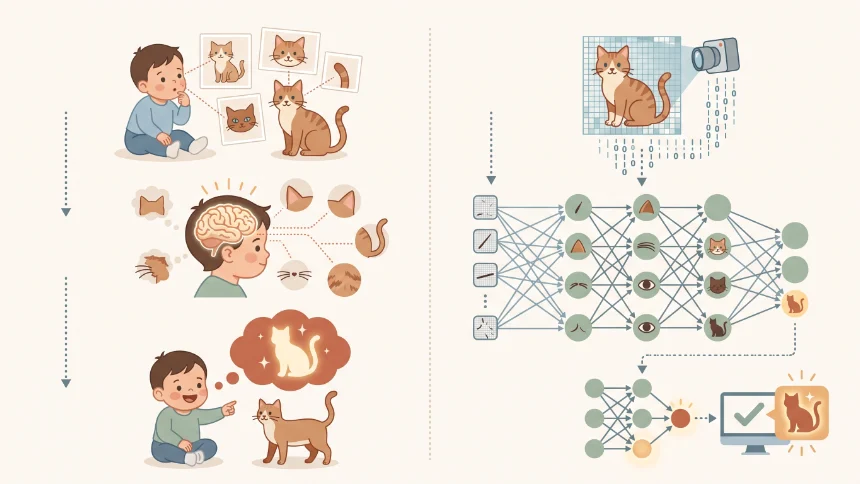
Models start completely empty. During training they make guesses, check how wrong those guesses are, tweak internal settings, and repeat. Billions of iterations happen. Plain and simple: AI takes huge piles of existing data, learns recurring patterns, and spits out predictions. There is no magic trick here, only massive-scale math.
Every AI tool follows this same core logic. The big difference is what kind of data each model was trained on. Language models learn text patterns. Image models learn visual pixel relationships. Once this clicks, evaluating and using AI becomes far less confusing.
For practical day-to-day use in 2026, AI tools fall into five clear buckets:
- Language Models: ChatGPT 5.2, Gemini 3, DeepSeek 3.2, Claude, Grok. Good for writing, analysis, coding and research work.
- Image Generators: Nano Banana Pro, known for keeping character features consistent and outputting clean 4K files.
- Video Generators: Veo 3.1, Kling 3.0, turning text prompts into short cinematic clips.
- Audio AI: voice cloning, voice swapping, narration, plus original music generation with Suno.
- Productivity & Automation AI: Open Claw, Zapier, built to cut down repetitive manual work across your apps.

Working with Large Language Models (LLMs)
Large language models run on transformer tech. Whatever you type gets split into small chunks called tokens. Important point: these tools don’t look answers up from some database. They keep calculating which word or token is most likely to come next, piece by piece, until a full reply forms.
Two things make them perform well: massive volumes of training text, and attention mechanisms that let the model zero in on what actually matters inside your input.
Quick real-world notes on popular models:
- ChatGPT 5.2: All-round reliable. Tolerates messy, badly written prompts, handles complicated reasoning tasks well.
- Gemini 3: Google’s multimodal option. Handles text, images, code and very long documents natively.
- DeepSeek 3.2: Solid open-source option, delivers comparable performance without heavy costs.
- Claude: Works great for long articles, scripts and coding. Picks up subtle context most models miss.
- Grok: Taps into live real-time data, best for news, trending topics and ongoing events.
I’ve settled on three straightforward rules that consistently improve LLM outputs:
- Give enough context. Skip lazy requests like “fix my resume”. Mention your current role, the job you want, skills you want highlighted, tone expected in your industry and target length. Don’t force the AI to guess.
- Set a role for the model. Tell it “you are a senior hiring manager reviewing this resume”. It sounds silly at first, but it shifts its whole perspective and improves feedback noticeably.
- State what you do NOT want. Call out things to avoid: overused buzzwords, keep output one page, don’t list soft skills with zero supporting examples. Constraints make outputs sharper.
Bad prompt: Write me a product description.
Solid prompt: Act as an e-commerce copywriter. Write a 150-word product description for wireless noise-cancelling headphones aimed at remote workers. Tone: casual but premium. Focus on battery life and wearing comfort. Do not name competing brands.
Image Generators
Most modern image generators use diffusion models trained on millions of paired images and text captions. Generation starts from total visual noise. The model gradually strips away randomness and builds structure following your prompt. It’s similar to sculpting: you start with a rough block and carve details into place.
Nano Banana Pro stands out in 2026 mainly for character consistency. It holds faces and outfits steady across different poses, supports multiple reference images, and exports clean 4K files ready for real work.
I use this six-part breakdown every time I write image prompts:
Subject + Action + Environment + Art Style + Lighting + Fine Details
Bad prompt: Generate a portrait of a woman.
Solid prompt: Subject: woman in her 30s. Action: standing. Environment: beside rain-streaked window. Art style: editorial photography. Lighting: soft diffused daylight from left. Details: freckles, linen shirt, warm earth-toned palette, shallow depth of field.
Video Generators
Video generators basically take image-model logic and add time into the mix. Instead of one static picture, they crank out a sequence of connected frames. Models learn not just what things look like, but how they move: spatial relationships inside each frame, plus motion shifts frame-to-frame.
Top usable tools right now:
- Veo 3.1: Great visual realism, natural lighting and physical movement for short clips.
- Kling 3.0: Gives you solid manual control over camera movement and object motion within scenes.
Writing prompts for video builds on image prompting, but you also have to describe movement. Lay out your scene, and be clear about camera movement, subject movement and how things shift over time. Don’t pile too many ideas into one prompt. Stick to one main action, one setting and one camera movement, you’ll get far more stable footage.
Bad prompt: A dog running in a park.
Solid prompt: Golden retriever sprinting sun-dappled meadow toward camera, floppy ears, wind-blown grass, shallow depth of field, warm afternoon sunlight, handheld camera aesthetic with subtle motion blur.
Audio AI
Today’s voice AI can produce narration that is really hard to tell apart from real human speech. Feed it text, and it sorts out stress points, pauses, tone and emotional rhythm automatically. Four practical ways people use it day-to-day:
- Pick pre-built voices from libraries covering different ages, accents and moods.
- Describe the voice you want in text to generate brand-new custom voices.
- Voice cloning: upload a short audio sample to replicate a person’s voice for unlimited text-to-speech output.
- Voice swap: swap out spoken audio in existing videos while keeping original timing and emotion intact.
For original music work, Suno is the go-to tool. Describe genre, mood, tempo and overall vibe. Keep your description concise, like briefing a real composer, don’t write long paragraphs.
Productivity & Automation AI
Unlike content-generation tools, productivity-focused AI exists to cut down tedious repetitive work so you free up time for actual creative tasks. Two main categories:
- Workflow automation (Zapier-style). Connect the apps you already use. Set triggers so when something happens in one app, it automatically runs actions in others. Automate form handling, welcome emails, social post drafting and scheduling without manual copy-paste work.
- Local digital agents (Open Claw). Installed locally on your computer, works with most major LLMs. It handles research, document filling, simple development tasks and routine practical work, acting like a digital assistant.
Three Common AI Mistakes Everyone Makes
- Treat AI like Google search. Throwing super-short vague prompts gets you generic, shallow output.
- Expect AI to read your mind. It knows nothing about you, your project or things you have tried before. If you don’t write that context down, it cannot work with it.
- Quit after one bad result. AI work is iterative. Your first output is a draft, not final delivery. You refine, add details and adjust. People getting great results are tweaking, not getting perfect output on the first try.
One simple mental model I keep in mind: think of AI as a sharp new junior team member. Fast, has access to tons of information, but knows nothing about your standards or your workflow. The better you brief it, the better output you receive.
You don’t need to chase every new AI release. Understanding these basics already puts you ahead of most casual users.