AI coding agents can churn out large volumes of working code extremely fast. But this creates a new pain point: human developers can no longer keep up reading and understanding everything produced. Code may run correctly, yet changing one file can silently break unknown downstream dependencies. When multiple team members generate code via agents, knowledge of implicit relationships inside the repository becomes scattered or entirely lost.
In this article we walk through building Cardograph, a full‑stack code‑intelligence application. It parses real source‑code files to build a visual dependency map, lets you inspect blast radius of changes, and answers questions about your repository. The critical ground rule: every connection in the map comes from parsed code, not AI guesswork.
The real problem with AI‑written code
AI agents produce functional code quickly. The danger is not broken syntax, but hidden dependency graphs. A single file can be imported by many other files that are not obvious from folder structure.
- Code runs fine today.
- Modify one file, and unknown parts of the system break.
- On teams, no single person knows the full impact scope of edits.
- Traditional chat‑based AI may invent file relationships that do not actually exist. A map that is 90 % accurate can be more dangerous than no map at all.
Cardograph solves this by grounding all analysis on static parsing, not LLM summarization.
What actually counts as an AI Agent
Many people mistake sending one prompt‑response LLM call for an agent. That is just a single remote text call.
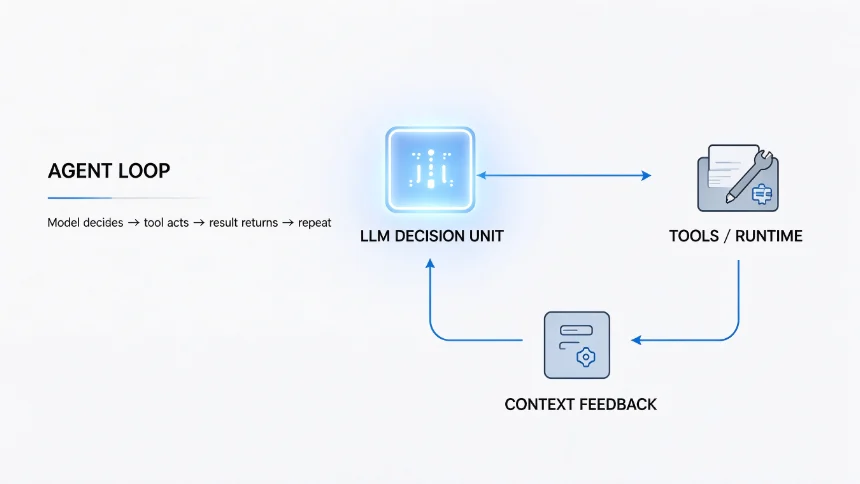
A genuine agent is a loop:
- Large‑language model outputs instructions about which files or resources it needs.
- External runtime fetches those real resources.
- Results feed back into the context window.
- Model decides next step, repeat.
The LLM only makes decisions. It cannot open files, run commands or read disks by itself. This loop brings higher cost, latency, and new failure modes, but enables complex multi‑source work such as exploring large codebases.
Core tech stack overview
- Next.js + TypeScript: Front‑end and application backend
- TS‑Morph: Static parser for extracting real imports and exports from source files
- React Flow: Render interactive dependency graph map in browser
- Clerk: Multi‑tenant authentication, organization & team management
- Supabase: Database, row‑level security (RLS) for isolating team data
- LangSmith: Tracing, logging, evaluation for detecting AI hallucinations
- CodeRabbit: Automated pull‑request code review for AI‑generated code
- MCP (Model Context Protocol): Connect agent to database and external services
Key design principle: Parser logic must remain decoupled from UI or web‑framework code. Parsing receives file paths and returns structured data, independent of frontend implementations.
Development workflow: Spec‑Build‑Check
Instead of writing long free‑form prompts, the project uses a spec‑build‑check workflow.
- Write specification documents in plain English: define feature goals, constraints, forbidden behaviours, and acceptance criteria before writing any code. Store these under a
/docs/specsfolder. - Let the coding agent read the spec and implement functionality.
- Run acceptance checks to verify behaviour matches requirements. If it fails, discard generated code, fix the spec file, and rerun, rather than stacking prompt fixes on broken code.
Two critical supporting documents guide the agent:
project‑doc.md: Describes product purpose, target users, scope / out‑of‑scope, known risks and assumptions.claude.md(agent rules): Defines invariant rules, forbidden actions and communication style. For Cardograph, one hard rule: never guess file connections; edges exist only when parser resolves real imports.
Phase‑by‑phase implementation highlights
Phase1: Authentication & multi‑team workspace
Set up Clerk organizations, link with Supabase, enable row‑level security. Every piece of analysis data belongs to an organization; users can only view their own team’s repository analyses. Session tokens carry organization identity so database policies enforce access control.
Phase2: Database schema & workspace dashboard
Create tables for projects, analyses, files, edges, insights. Enforce RLS on every table. Authorization logic lives in database policies rather than application‑side filtering, preventing accidental cross‑team data leaks.
Phase3: Code parser built with TS‑Morph
The parser walks repository directories, extracts real imports, re‑exports and dynamic string imports. It computes fan‑in / fan‑out metrics and records resolution outcomes: resolved inside repo, external dependency, skipped, or failed with explicit reason.
Important: No guessing relationships from file names or conventions. Every graph edge comes from actual parsed import statements.
Phase4: Interactive dependency map (React Flow)
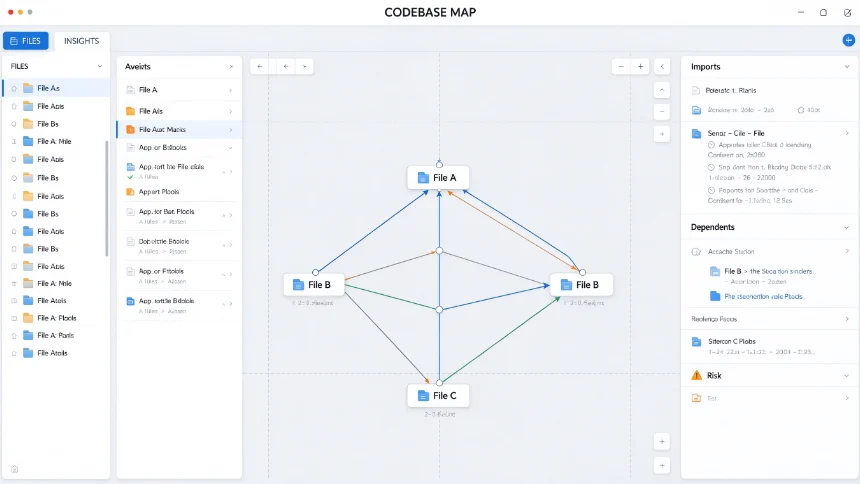
Build three‑column layout: sidebar, central graph canvas, detail panel. Implement folder folding logic for large repositories; folders merge upward when containing few files to avoid visual overload. Selecting nodes dims unrelated parts of graph and highlights incoming / outgoing edges.
Phase5: File & folder detail panel
Show metadata, import lists, dependency counts, repository overview summary. All data loads client‑side from parsed analysis cache; clicking UI elements triggers no new network requests.
Phase6: Blast radius, dependency chain and insights
Implement graph traversal utilities to compute blast radius (what might break if you edit a file) and dependency chains. Detect import cycles, unused‑looking files, and large files. Distinguish truly unused files from framework entry‑points which are invoked by runtime rather than import statements.
Phase7: Repository import pipeline
Accept public GitHub repository URLs. Download archive, parse code, persist analysis results into database. Use real‑time database subscriptions to feed progress status to frontend without browser polling. Handle stale / hung analysis jobs.
Phase8 & 9: Framework adapters and CommonJS support
Add adapters for Next.js, NestJS, React, Express. Adapters detect framework‑specific file roles without inventing routes or conventions that cannot be statically verified. Extend parser to handle require() style CommonJS imports while preserving existing parsing output for unchanged repositories.
Guard against AI hallucination with evaluations
LLMs can invent file paths, imports or logic that do not exist in source code. The project builds deterministic evaluators grounded in parsed source truth:
- Record every LLM call: inputs, outputs, token cost inside LangSmith traces.
- Run deterministic checks: verify every file path mentioned by AI actually exists inside parsed dataset. No secondary LLM is used to grade outputs.
- Run role‑classification evaluations: compare AI‑assigned file roles against ground‑truth known from framework conventions to measure accuracy numerically.
Instead of subjective human feeling, you get measurable scores to compare prompt changes and model upgrades.
Agent service architecture
The question‑answering agent does not live inside Next.js web server. It deploys as separate managed deep‑agent service. It calls back to main application via authenticated readonly HTTP endpoints to access graph data. Short‑lived signed credentials scope agent access strictly to one organization and one analysis, preventing prompt‑injection from untrusted source‑code manipulating which repository the agent reads.
Closing thoughts
When you build applications heavily relying on AI code generation, your work shifts away from writing every single line of code. Your core job becomes defining requirements, setting hard constraints, verifying outputs and measuring correctness.
Cardograph demonstrates a pattern: ground AI reasoning on deterministic parsed ground‑truth data, avoid letting models invent facts, and build evaluators to catch silent hallucinations. Even if you do not build this exact tool, the spec‑build‑check workflow and evaluation mindset transfer to most agent‑powered software projects.