What n8n-MCP Actually Is
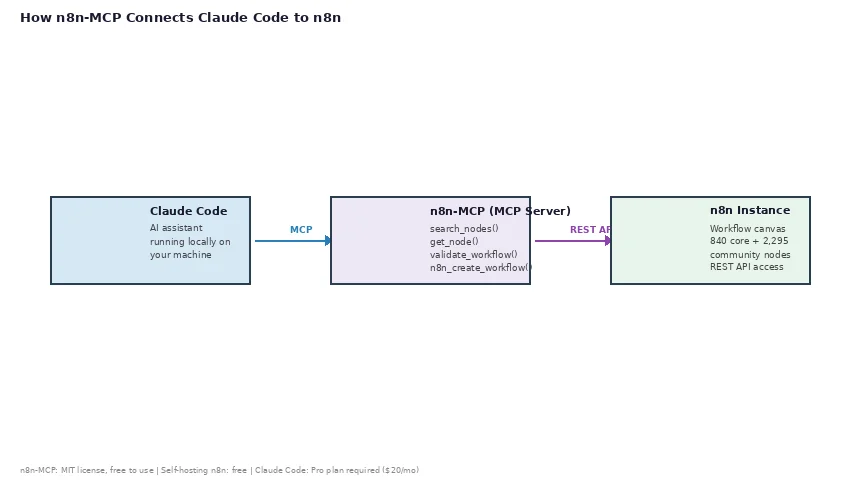
n8n-MCP is a Model Context Protocol server maintained by Romuald Członkowski. It bridges Claude Code and your n8n instance. Once connected, Claude Code can read n8n documentation, search for the right nodes, validate their configuration, and create or update workflows — all through natural-language prompts.
This is different from the earlier article on production-grade n8n automations, which focused on built-in n8n capabilities and assumed you already knew how to use the n8n canvas. This guide starts from zero.
Prerequisites and First Connection
Before you begin, make sure you have:
An n8n instance — self-hosted (Docker or npm) or cloud. Self-hosting n8n is free. Cloud plans are available at n8n.io/pricing.
Claude Code — installed on your machine. On Linux, macOS, or WSL, run npm install -g @anthropic-ai/claude-code. On Windows, use the official installer. Claude Code requires an active Claude plan (Pro or higher).
Node.js 18+ — only needed if you run n8n-MCP via npx.
Cost summary: n8n self-hosting is free. n8n-MCP is free and open-source (MIT license). Claude Code requires a paid Claude subscription (Pro plans are listed at anthropic.com/pricing). The hosted dashboard option (dashboard.n8n-mcp.com) offers 100 free tool calls per day.
Step 1 — Generate an n8n API Key. Open your n8n instance and go to Settings → API → Create an API Key. Copy the token before closing the dialog — n8n does not display it again.
Step 2 — Add n8n-MCP to Claude Code. Run this in your terminal on Linux, macOS, or WSL:
claude mcp add n8n-mcp \
  -e MCP_MODE=stdio \
  -e LOG_LEVEL=error \
  -e DISABLE_CONSOLE_OUTPUT=true \
  -e N8N_API_URL=http://localhost:5678 \
  -e N8N_API_KEY=your-api-key \
  -- npx n8n-mcp
On Windows PowerShell, use backtick line continuations:
claude mcp add n8n-mcp `
  -e MCP_MODE=stdio `
  -e LOG_LEVEL=error `
  -e DISABLE_CONSOLE_OUTPUT=true `
  -e N8N_API_URL=http://localhost:5678 `
  -e N8N_API_KEY=your-api-key `
  -- npx n8n-mcp
Step 3 — Verify the connection. Inside any Claude Code session, type /mcp. You should see n8n-mcp listed with a green status. If you get an error, check that the base URL has no trailing path and that the API key has no surrounding whitespace.
Building an Email-to-Slack Workflow
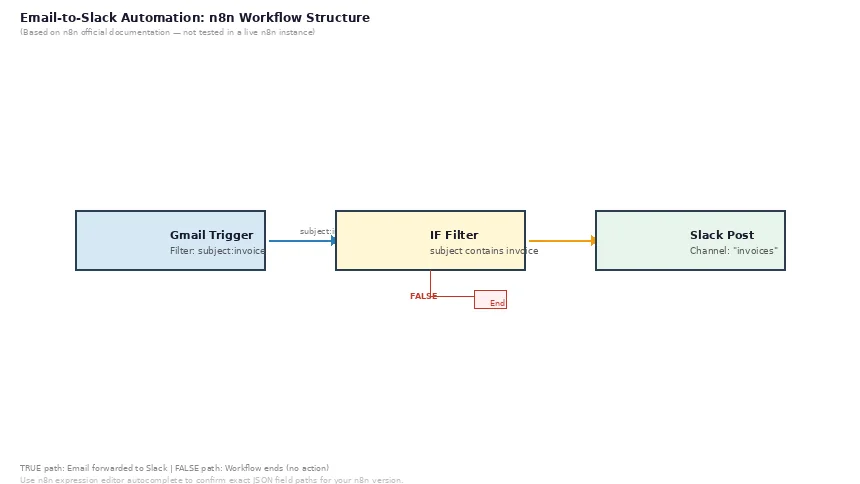
Here is the workflow you will build: when an email arrives with a specific term in the subject line, extract the from address and subject, then post a notification to a Slack channel. This example is based on official n8n documentation — it has not been run in a live n8n instance.
Step 1 — Describe what you want. In your Claude Code session, paste this prompt:
Build me an n8n workflow:
1. Trigger: Gmail email arrival (new unread email)
2. Filter: only emails with "invoice" in the subject (using Gmail search syntax: subject:invoice)
3. Extract the from address and subject line from the email headers
4. Post to Slack: channel "invoices", text "Invoice received from {sender}: {subject}"
5. Name the workflow "Invoice Alert to Slack"
Step 2 — What Claude does. Claude Code queries the n8n-MCP tools to find the right nodes. It calls search_nodes() for the Gmail trigger and Slack node, get_node() on each to read the parameter schema, search_templates() for a similar pattern, and validate_workflow() before deploying.
Step 3 — Review the generated workflow. The Gmail Trigger’s Simplify mode returns email headers including From and Subject. In the n8n expression editor, use the field name From for the sender and Subject for the subject line — the exact JSON path varies by n8n version; the expression editor’s autocomplete will show the correct field once your Gmail credentials are connected. The Slack node’s Channel field takes the channel name directly (such as invoices, not #invoices).
Step 4 — Deploy. Tell Claude Deploy this to my n8n instance. Claude calls n8n_create_workflow() and returns the workflow ID with a link to open it in the n8n canvas.
Step 5 — Activate and test. Open your n8n instance, find the workflow, connect your Gmail and Slack credentials, click Activate, then send yourself a test email with “invoice” in the subject. If the workflow does not fire, check the Executions tab — the from and subject field names depend on whether Simplify is turned on or off.
Tools Reference and Common Mistakes
n8n-MCP exposes tools throughout the development cycle. Three pitfalls are flagged in the official documentation:
1. Relying on default parameter values. A configuration like { resource: "message", operation: "post" } will fail because n8n requires every field to be explicit. Use validate_node({ mode: "minimal" }) before building.
2. Connecting nodes without specifying the branch. IF nodes have two outputs (TRUE and FALSE). Include branch: "true" or branch: "false" for each connection — otherwise both connections land on the same output.
3. Skipping template search. The n8n template library has 2,352 workflow templates (verified against the n8n-MCP README as of October 2026) with ranked configurations. Search with search_templates({ query: "your task" }) before building from scratch — a template gives you a verified starting configuration.
FAQ and Pricing
Q: Do I need to understand n8n before using this?
The core value of n8n-MCP is that you do not need to know which nodes exist or how to configure them from memory — Claude looks them up. You still need to understand what you want to automate. If you have never seen an n8n workflow before, plan to spend 20–30 minutes exploring the canvas after your first AI-generated workflow deploys.
Q: Can I use this with n8n cloud instead of self-hosting?
Yes. Set N8N_API_URL to your n8n cloud instance URL and use your cloud API key. The MCP server and the n8n instance do not need to be on the same machine.
Q: Is it safe to give Claude Code access to my n8n instance?
Treat the n8n API key like a password. The MCP server only communicates with your n8n REST API. The author of n8n-MCP explicitly recommends: make a backup before editing any production workflow with AI.
Q: Can I use n8n-MCP with editors other than Claude Code?
Yes. The project supports Claude Desktop, VS Code, Cursor, Codex, and Windsurf.
Q: What if the generated workflow does not work?
Use validate_workflow() before deploying — it catches missing required fields, broken connections, and invalid expressions. If a deployed workflow still fails, check the execution log (click the workflow name → Executions tab).
What this setup costs: n8n self-hosting is free. n8n cloud plans are listed at n8n.io/pricing. n8n-MCP is free (MIT license). Claude Code requires a Pro subscription (starting at $20/month).
Note: This article is based on reviewing official n8n and n8n-MCP documentation. The Gmail trigger, Slack node, and workflow deployment steps have not been run in a live n8n instance. Field names (such as from vs sender and the exact JSON paths for email headers) are taken from n8n’s official documentation. Verify specific parameter names in your n8n version before relying on them.