Most businesses do not lose productivity because of one catastrophic breakdown. Productivity leaks happen in small fragments: manually copying lead data into spreadsheets, building reports every Friday, repeatedly chasing managers for approvals, asking clients to re‑submit identical information. Workflow automation is designed to close these tiny drains, by building repeatable paths from trigger to final outcome.
Buying automation software alone will not fix your operations. Reliable workflows need clear triggers, clean input data, explicit decision logic, accountable owners, permission controls, failure visibility, and measurable success metrics. Many teams end up running a collection of disconnected, fragile bots because they skip the process‑mapping phase before building anything.
In 2026, modern automation mixes strict rule‑based logic with AI capabilities such as document parsing, text classification and summary generation. The core principle remains: rules handle certainty, AI handles ambiguity, and humans approve high‑risk or irreversible actions.
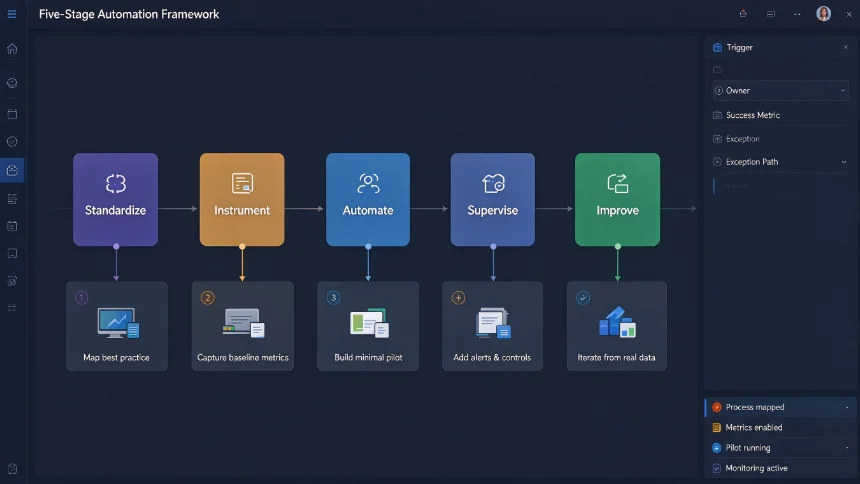
Five‑stage implementation framework: Standardize, Instrument, Automate, Supervise, Improve
This sequence avoids the common mistake: automating a messy existing process exactly as‑is. If your team cannot agree what counts as a qualified sales lead, automating routing will only spread confusion faster. You have to standardize first, even if your first version stays intentionally simple.
- Standardize: Align on current best‑practice process, required data fields and responsible owners. Output: documented happy‑path workflow + list of known exceptions.
- Instrument: Capture timestamps, status updates, errors and hand‑off events. Output: baseline metrics for cycle time, volume and rework frequency.
- Automate: Build the smallest practical pilot targeting one single bottleneck. Output: minimal usable workflow with defined trigger, actions and safety controls.
- Supervise: Add alerts, approval gates, permission rules and failure recovery steps. Output: production‑ready workflow you can trust.
- Improve: Periodically review runtime logs and user feedback. Output: fewer failures, shorter cycle times, higher team adoption.
How to pick which workflow to automate first
The highest‑value candidates are not always the tasks people hate the most. Prioritize work that repeats frequently, follows clear rules, exists in digital format and creates real damage when delayed. Hold off on tasks relying on subjective judgment, unstable policies or inconsistent source data.
You can evaluate candidates across six dimensions: frequency of occurrence, manual time spent per run, clarity of business rules, completeness of digital input data, cost when errors happen, frequency of exceptional edge‑cases.
A practical scoring heuristic: (frequency × manual effort × rule clarity × error cost) ÷ exception rate
This formula is not mathematically precise. Its real purpose is to give you a consistent way to compare multiple candidates side‑by‑side. After scoring, add manual judgement for business value and implementation difficulty before starting your pilot.
24 practical automation ideas across six business functions
Sales & Revenue ‑ Capture website form leads, validate required fields, route leads by region, service type or deal scale ‑ Enrich new lead records, generate personalized follow‑up drafts for sales review ‑ Trigger proposal tasks and approval requests once opportunities hit predefined stages ‑ Alert account owners when deals stay inactive past agreed timelines
Marketing & Content ‑ Turn approved content briefs into tasks, deadlines and reviewer assignments ‑ Collect campaign assets via forms, validate required files and UTM parameters ‑ Build weekly performance digests pulling data from ads, analytics and CRM ‑ Route negative brand mentions and risky comments to human review queues
Client Delivery & Operations ‑ Convert signed agreements into projects, folder structures, kick‑off checklists and internal team channels ‑ Send milestone reminders, escalate overdue client approvals ‑ Generate recurring service tasks based on contract start‑ and renewal dates ‑ Finalize project closure only after documentation, billing and access‑removal checks complete
Finance & Administration ‑ Match payment webhooks against invoices, flag unmatched transactions for manual review ‑ Send tiered invoice reminders based on due dates and customer status ‑ Route purchase requests according to approval thresholds before order creation ‑ Compile monthly expense exceptions instead of reviewing every normal transaction manually
People & Knowledge Operations ‑ Kick‑off pre‑boarding workflows the moment a candidate becomes confirmed hire ‑ Generate role‑specific on‑boarding checklists for managers, IT and HR ‑ Parse meeting notes to generate assigned tasks, due dates and source references ‑ Remind document owners to review policies and standard operating procedures on schedule
Customer Support & Success ‑ Classify incoming support tickets, detect urgency and route to correct queues ‑ Send status updates when tickets change state or sit unaddressed too long ‑ Trigger customer health review tasks when usage or support metrics cross thresholds ‑ Launch human check‑in workflows when client on‑boarding milestones stall
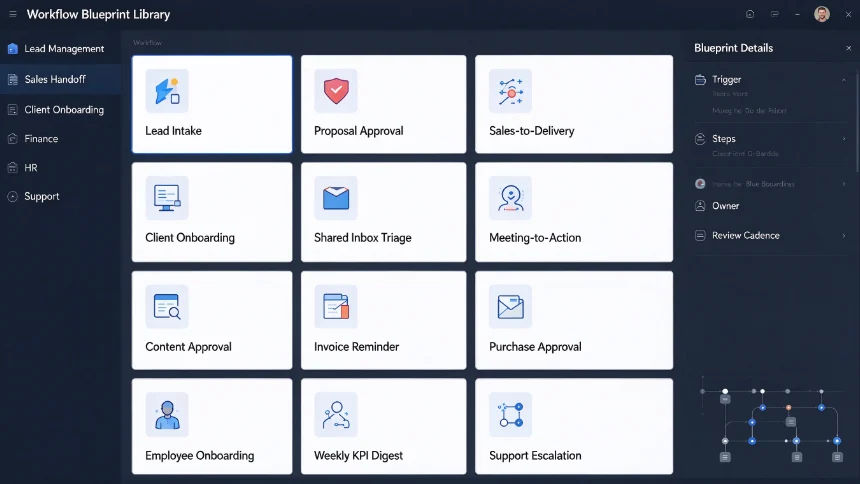
12 reusable production‑ready workflow blueprints
These blueprints are battle‑tested templates you can adapt for your own team:
- Lead intake & qualification: Form / referral trigger → validate contact data → deduplicate CRM records → classify interest → compute qualification score → assign owner → generate follow‑up task. Keep uncertain leads for human review. Measure first‑response speed and record completeness.
- Proposal creation & approval: Opportunity reaches proposal‑requested state → pull account data → generate draft from approved template → trigger commercial approval for high‑value deals → human final confirmation before sending. Lock pricing and legal text from generative edits. Measure turnaround and rework volume.
- Sales‑to‑delivery handoff: Contract signed → spin‑up project resources → copy approved scope → assign delivery lead → create kick‑off checklist → provision client shared folders. Cross‑validate signed contract against CRM records. Measure time‑to‑project‑ready.
- Client on‑boarding: New client activated → collect missing data → send welcome sequences → provision shared resources → assign on‑boarding tasks → monitor milestone completion. Keep credentials out of chat / form inputs. Track on‑boarding completion rate.
- Shared inbox triage: New incoming message → identify customer & urgency → attach account context → assign queue → optionally draft replies for human review. Never auto‑send high‑risk legal, financial or complaint messages. Measure assignment accuracy.
- Meeting‑to‑action workflow: Process meeting transcripts / notes → extract decisions, tasks, assignees and deadlines → create system tasks → post summary to team channel → preserve source reference. Require assignee confirmation before committing external deadlines. Measure action‑item assignment speed.
- Content production & approval: Approved brief → create drafting, design, review, SEO and publishing tasks → pass work only after required fields complete → notify next stakeholder → record final published URL. Block publishing without fact‑check and copyright review. Measure full cycle time brief‑to‑publish.
- Invoice reminder & escalation: Invoice due‑date trigger → check payment status → send tiered reminders → notify account owner at threshold → spin‑up collections task for exceptions. Suppress reminders for disputed invoices or recently‑received payments. Track overdue balance and manual follow‑up overhead.
- Purchase & vendor approval: New purchase request → validate budget codes → route approvals by amount and department → create order record → notify requester. Separate requester and approver roles for high‑value spend. Measure approval cycle and invalid‑request ratio.
- Employee on‑boarding: Confirmed hire with start date → trigger HR, IT, facilities tasks → provision accounts on correct timelines → distribute role resources → track progress up to day‑30 / day‑90. Apply least‑privilege access rules, do not provision accounts before approvals complete. Measure day‑one readiness and overdue tasks.
- Weekly KPI digest: Scheduled weekly trigger → aggregate trusted source data → run deterministic metric calculations → annotate notable shifts → attach source links → deliver to target audience. AI can summarize results but cannot alter source numbers. Measure report‑building overhead and data‑correction frequency.
- Support escalation: Ticket severity / sentiment / waiting‑time threshold hit → alert on‑call owner → generate incident record → gather context → send stakeholder periodic updates. Include manual override and explicit resolution owner. Measure acknowledgement and resolution time.
Divide responsibilities: Rules, AI and Humans
‑ Use rules: Conditions are exact & repeatable; calculations must be deterministic; full audit trail required. ‑ Use AI: Input data unstructured or ambiguous; need text classification, extraction or summarization; generate drafts / recommendations to accelerate human decisions. ‑ Require human review: Actions touching money, system access, employment status, legal content, brand reputation; low‑confidence or novel exceptions; scenarios requiring empathy and negotiation.
AI can parse messy emails into structured fields, but rules validate required fields. AI writes draft replies, but humans approve sensitive outbound messages. AI summarizes performance data, but core metrics must come from trusted source datasets.
Platform selection guidance
‑ Zapier: Best for non‑technical teams, fast setup, massive SaaS connector library. Watch task volume costs and limits for complex branching logic. ‑ Make: Great for multi‑step visual scenarios and heavy data transformation. Watch learning curve, operation‑count billing, documentation overhead. ‑ n8n: For engineering‑oriented teams, self‑hosting support, custom AI workflow logic. You take ownership of infrastructure, security patches and maintenance work. ‑ Power Automate: Deep native integration inside Microsoft 365 / Teams / SharePoint / Dataverse. Watch licensing costs, environment governance, premium connector pricing.
Production reliability & governance checklist
‑ Assign one business owner + one technical maintainer for every live workflow ‑ Prefer service‑account connections instead of personal user credentials ‑ Validate mandatory fields before downstream operations execute ‑ Build deduplication / idempotent logic to avoid duplicate tasks / records from retries ‑ Strictly separate test and production datasets; test happy‑path, missing‑input, duplicate and anomalous cases ‑ Persist logs: workflow ID, execution timestamp, source record identifier, outcome and error details ‑ Send targeted failure alerts to responsible owners; avoid spamming broad team channels ‑ Document trigger logic, execution steps, dependencies, permissions, exception paths and manual fallback procedures ‑ Fixed monthly / quarterly review cadence: audit access permissions, cost, success rate and real business value
30‑day practical roll‑out roadmap
- Days 1‑5: Observe & map existing process. Deliverable: current‑state process map, baseline metrics, known‑exception inventory.
- Days 6‑10: Design target workflow. Deliverable: trigger definition, data schema, business rules, ownership, safety controls, success metrics.
- Days 11‑17: Build narrow pilot inside test environment. Deliverable: functional test‑version workflow with sample datasets.
- Days 18‑22: Complete testing & documentation. Deliverable: test evidence, failure alert setup, fallback runbooks, owner guide.
- Days 23‑26: Limited real‑user pilot. Deliverable: gather real‑world feedback, resolve uncovered edge‑cases.
- Days 27‑30: Full launch + formal review. Deliverable: live production workflow, monitoring dashboard, scheduled 30‑day review point.
Do not judge success only by whether the workflow technically runs. Measure real business impact: faster response, fewer missing fields, shorter cycle‑time, reduced rework volume, less manual chasing, improved visibility. A technically‑perfect workflow solving low‑value work still delivers poor return.
Measure realistic ROI, avoid imaginary time‑savings
Start with conservative baseline metrics: monthly volume, average manual minutes per item, rework overhead, delay‑related business cost, platform subscription expense. Compare against identical metrics after deployment. Count only capacity employees truly free‑up and redirect to higher‑value work.
Example reference calculation: Team handles 300 requests per month. Manual baseline: average six minutes handling each request, total 30 hours monthly. Post‑automation: 80% requests need one‑minute human review; 20% still need full six‑minute handling. New total handling time = 12 hours per month. Deduct platform cost, maintenance and review overhead to get net recovered capacity.
Key KPIs to track: full cycle time, manual handling time per item, first‑pass success rate, exception / failure ratio, duplicate‑record occurrences, failure acknowledgement latency, user bypass rate, monthly platform costs.
Frequently Asked Questions
What workflow should I automate first? Start with high‑frequency, rule‑driven, digitally‑trackable work with clear ownership. Common starting candidates: lead routing, request intake, task generation, invoice reminders, weekly reporting.
Difference between plain workflow automation and AI‑enhanced automation? Standard workflow automation moves work through fixed predefined steps. AI‑enhanced adds classification, content extraction, draft generation, intelligent routing. Robust production systems combine deterministic rules, limited‑scope AI steps and mandatory human review gates.
Can small businesses build automation without dedicated developers? Yes. No‑code platforms connect mainstream SaaS tools and support multi‑step flows. Core required skills are process mapping, data discipline, thorough testing and documentation. Custom API integration, self‑hosting and complex exception logic benefit from technical support.
How many workflows should you launch simultaneously? Begin with one or two pilot workflows. Narrow roll‑out lets your team learn governance, testing and maintenance before scaling. Too‑fast expansion causes duplicated logic, inconsistent data and unclear ownership.
Can AI make high‑impact business decisions fully automatically? Only apply full automation for low‑risk, reversible decisions with high‑confidence input. Any change touching payments, employment, access permissions, legal terms or customer disputes must include human approval plus complete audit trails.
How frequently review live automations? Critical workflows: monthly review. Lower‑priority workflows: minimum quarterly review. Also trigger review after major app upgrades, policy adjustments, ownership changes or unexpected error spikes.
Final takeaway
The most valuable automation outcomes are not flashy demo tricks. They are quiet, predictable day‑to‑day operational improvements: every lead reaches an assigned owner, every approval has a firm deadline, new hires are ready on day‑one, every failure gets visibility. Always map your existing process first, pick one measurable bottleneck, build minimal reliable pilot, add supervision, then iterate based on real operational data.