Once you master basic n8n node building, the next hurdle is moving simple demo workflows into real‑world production. Many beginner workflows break when APIs timeout, data formats change or external services go offline.
This practical guide covers four must‑have production capabilities: webhook triggers, dedicated error‑handling workflows, reusable sub‑workflows and native AI‑Agent node. You will learn how to build automations that survive real‑world failures instead of only working inside your test environment.
Understand & implement Webhook Triggers
Polling means your workflow repeatedly checks an external source for new data on a fixed schedule. It wastes execution quota and introduces unwanted delay.
A webhook works the opposite way: external systems push data to your n8n endpoint the moment an event occurs. No constant polling, near real‑time reaction.
Common real‑world triggers for webhooks: form submissions, new customer orders, incoming web events from SaaS platforms.
Practical setup steps:
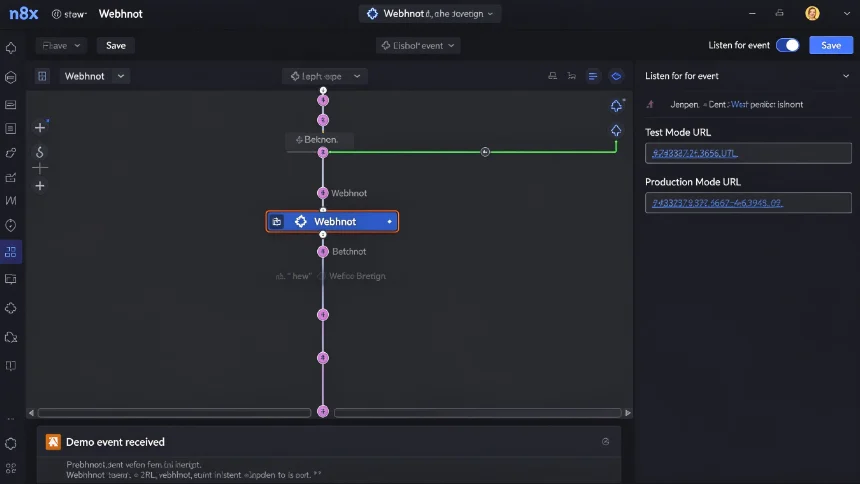
- Add Webhook trigger node inside your n8n workflow.
- Copy the production‑mode URL. Do not use test‑mode URL for live traffic.
- Paste this endpoint URL into your external service (Google Forms via AppScript, CRM, SaaS webhook settings).
- Activate workflow. Incoming events will automatically start your workflow.
Important note: Test‑mode webhook only stays active during your browser session; it stops working once you close the tab. Always switch to production endpoint for live usage.
Build dedicated error‑handling workflows
Most beginners ignore failure scenarios. When a node fails, whole workflow stops, nobody gets notified, and broken jobs stay invisible to you.
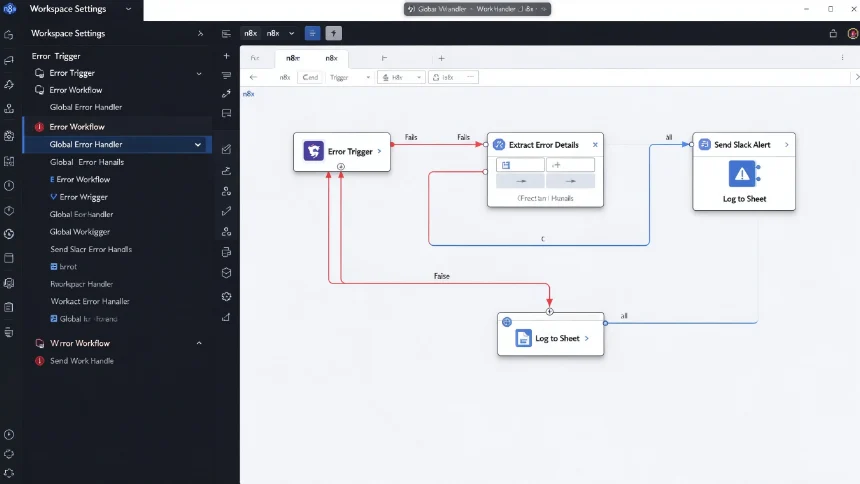
n8n supports global error workflows. When any workflow hits an exception, execution data automatically routes to your dedicated error‑handling workflow. You can build consistent failure logic once and reuse it across all your projectsn8n.
What you can do inside error‑handling workflow: ‑ Extract error type, error message, failing workflow name and execution log link ‑ Send structured alert message to Slack / Telegram channel ‑ Classify error severity: temporary API glitch vs permanent configuration mistake ‑ Log full failure details into Google Sheets or database for later review ‑ Add retry logic for transient network failures
You set this up inside workspace settings: assign your prepared workflow as the global error‑workflow. From this point onward every failing execution sends event payload there.
Sub‑Workflows: build reusable modular automation
When your workflow grows large, the canvas becomes cluttered, hard to debug and impossible to reuse logic elsewhere. Sub‑workflows solve this pain point.
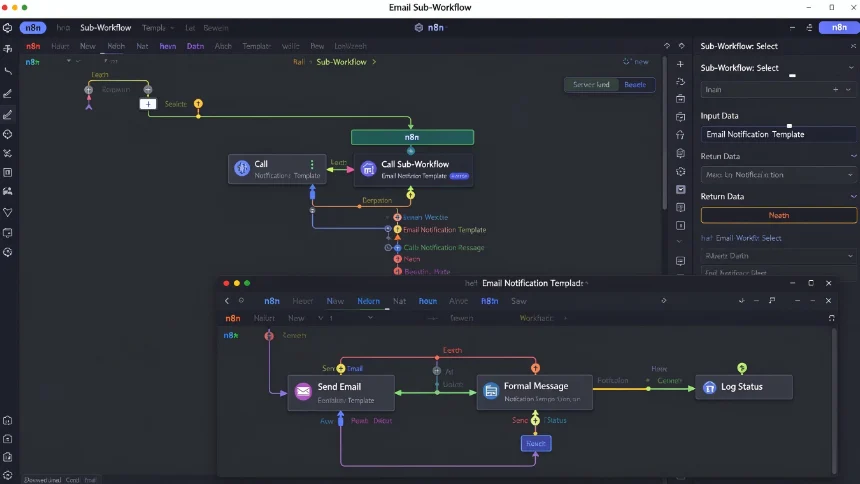
A sub‑workflow is a standalone workflow you can call from other main workflows. You pass input data into it, it runs its own nodes, then returns processed output back to parent workflown8n Commun….
Typical use‑cases for sub‑workflows: ‑ Standardised email sending template used across dozens of automations ‑ Common data cleaning / deduplication logic ‑ Reusable notification system for Slack alerts ‑ Isolated AI‑processing step that multiple parent workflows can invoke
Best practices:
- Keep sub‑workflow focused on one single responsibility.
- Define clear input‑schema and expected output schema.
- Test independently before connecting to parent workflow.
- Version your sub‑workflow, update once, all calling workflows inherit improvements.
Instead of copy‑pasting same 8‑node block into every new workflow, you call one single sub‑workflow node. If you need to tweak your email template later, edit only inside sub‑workflow, all consumers automatically get changes.
Get started with n8n native AI‑Agent Node
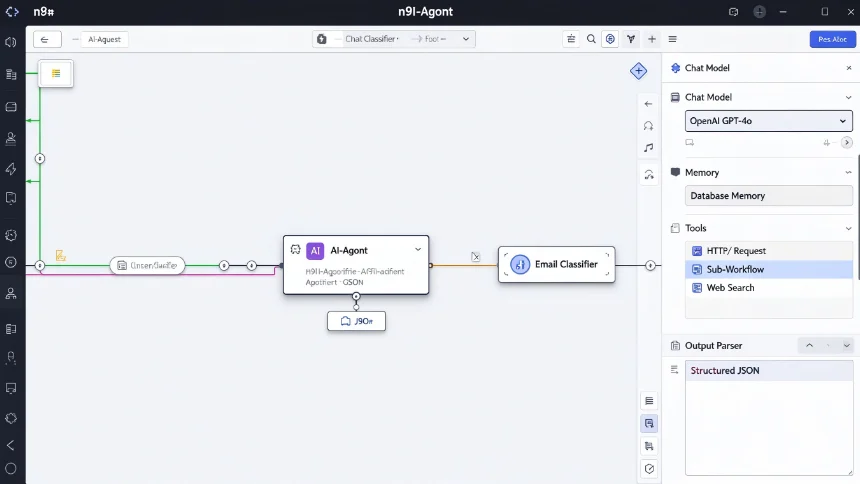
n8n ships with built‑in AI‑Agent node, you do not need complex external LangChain setup. The agent can combine LLMs (OpenAI / Anthropic / Gemini) + memory + call n8n tools or HTTP tools to complete multi‑step business tasks.
Core building blocks of AI‑Agent node:
- Chat Model: pick your large language model provider, set temperature and token limits.
- Memory: retain conversation context, either short‑term window memory or persistent database‑backed memory.
- Tools: grant agent abilities — run calculations, call HTTP APIs, invoke other n8n sub‑workflows, search web.
- Output parser: enforce structured JSON output to make downstream node processing reliable.
Real‑world beginner project: Email classification agent Feed incoming email payload into AI‑Agent. Agent classifies email type: sales enquiry, support ticket, spam. Return structured JSON result. Parent workflow reads JSON and branches execution accordingly: create CRM lead, open support ticket or discard spam.
Critical production tip: Always add fallback branch. If AI API times‑out or returns malformed JSON, do not crash workflow. Route to human review queue insteadn8n.
Enterprise‑grade collaboration features
Once you scale beyond personal automation into team / agency usage, leverage n8n enterprise‑oriented capabilities: ‑ Credential sharing: share app credentials among team members without exposing API secrets. ‑ Role‑based access control: editor, viewer, admin permissions for different team users. ‑ Workflow sharing & project folders: organise workflows per client / department. ‑ Execution audit logs, track who edited and ran workflows.
You do not need self‑hosted instance to use most collaboration features; n8n cloud pro‑plan supports these functions as well.
Closing thoughts
Simple drag‑and‑drop demos are easy. Building production‑ready automation requires handling events, failures, reusability and AI stability.
Start incremental adoption:
- Add a webhook‑trigger for one of your existing manual‑trigger workflows.
- Build one small global error‑alert workflow.
- Extract one repeated logic block and turn it into sub‑workflow.
- Try small‑scope AI‑Agent task like email classification.
Move step‑by‑step, instead of rewriting your whole automation stack at once.