If you’ve spent any significant time building software with AI coding assistants, you’ve probably run into this frustrating pattern. Things move lightning‑fast at the very beginning. A few days later though, your AI agent starts forgetting earlier decisions. Every new feature you add breaks something that already worked. Before you know it, your codebase turns messy and hard to maintain.
This is not some inherent flaw of AI models. More often than not, it boils down to poor architecture and loose project management. In 2026, many senior engineers don’t spend most of their days typing raw code. Their real job is architecting systems, and they hand over the grunt‑work implementation to AI agents. The gap between average developers and high‑performing ones is exactly this skill: sorting out architecture and constraints before prompting an AI to write code.
Two very different working styles have emerged among developers using AI tools. Vibe‑coding is what most people default to. You describe roughly what you want, let AI spit out code, then tweak results reactively. This works fine for quick throw‑away weekend prototypes. But bring it to production‑grade long‑lived projects and it falls apart fast. You end up spending more time untangling messy AI‑generated code than building actual features.
On the other side is spec‑driven agentic development. You keep architectural thinking human‑led. AI only executes implementation work. You lay out goals, hard boundaries, constraints and acceptance criteria first, then feed fully‑written specifications to your coding agent.
The six‑file context system
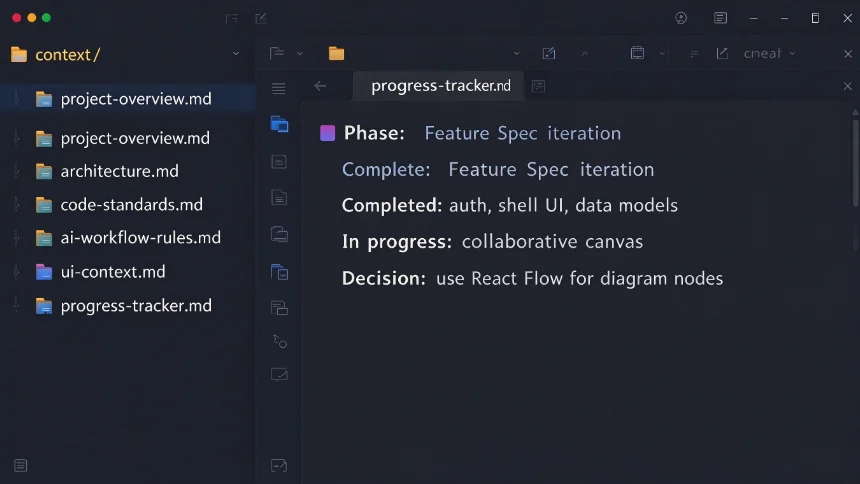
The six‑file context folder is what keeps your AI agent from drifting off‑track. These documents sit together in one directory. Your agent reads every single file before starting any coding task.
- project‑overview: Lay out product positioning, target users, core workflows. Explicitly write down what features you will and will not build, plus how you measure project success.
- architecture: Document your tech stack choices, boundaries between system layers, database models, and non‑negotiable invariants your codebase must respect.
- code‑standards: Lock in consistent conventions for TypeScript, Next.js patterns and error handling. This stops your agent from switching coding styles halfway through the project.
- ai‑workflow‑rules: Tell your agent how to split tasks, when to pause for human input, and ground‑rules for modifying existing code. Enforce working on only one feature unit at a time.
- ui‑context: Store design tokens, color palette decisions and layout rules for your application UI.
- progress‑tracker: This is the only file that gets updated constantly. Log current work phase, finished deliverables, work‑in‑progress items and key architectural decisions. When you pick work back up weeks later, your agent can resume exactly where you left off, no long re‑explaining required.
Workflow: build by feature spec units
Avoid dumping huge blocks of requirements into one giant prompt. Break your whole project into small, self‑contained deliverables we call feature specs. Each spec covers project goal, design trade‑offs, implementation steps, dependency notes and a simple checklist to verify completion.
Here is the practical rhythm we followed while building Ghost AI:
- Draft one feature‑spec document for a single piece of functionality.
- Instruct the agent: read all context documents plus this feature spec, update progress‑tracker, implement strictly as written and do not expand scope on its own.
- Agent completes coding work and updates progress‑tracker automatically.
- You review against the built‑in checklist. If bugs show up, write narrow, targeted corrective prompts instead of broad complaints.
- Merge working changes into Git, and move on to the next spec.
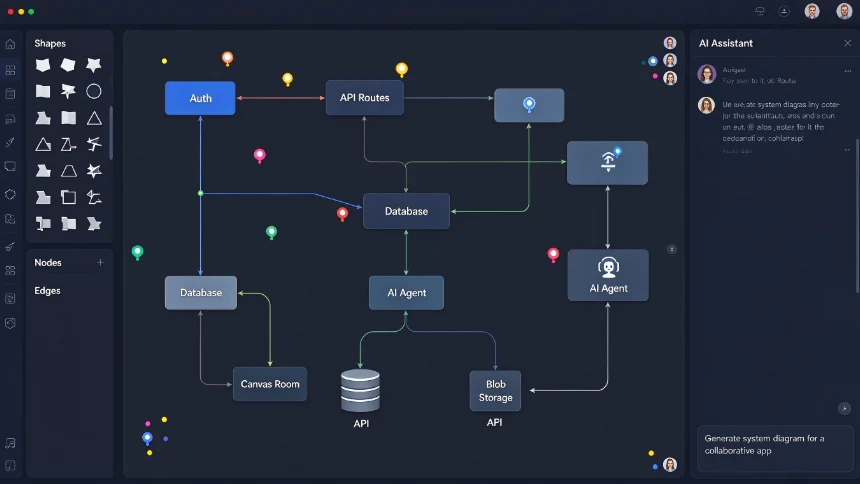
Ghost AI, our real‑time collaborative system‑design canvas app, was built end‑to‑end with this workflow. Tech stack we chose:
- Next.js + React 19 for application framework
- Clerk for authentication and user account management
- Prisma + Postgres as relational database
- Liveblocks to power multiplayer real‑time canvas collaboration
- Trigger.dev for long‑lived background AI tasks
- Vercel Blob to store canvas snapshots and exported markdown specs
Major build phases from the project:
- Initialize project, strip default boilerplate, spin up shadcn‑ui design system.
- Build authentication flows and route access protection.
- Create editor base shell UI: navigation bar, sidebars, modals for project creation, renaming and deletion.
- Set up Prisma data models, implement REST APIs for basic project CRUD operations.
- Build sharing functionality and collaborator permission controls.
- Wire Liveblocks room authentication, set up collaborative React Flow canvas foundation.
- Implement shape panel, node drag‑drop, resizing, inline label editing, custom connection edges and canvas keyboard shortcuts.
- Add live user cursors, collaborator avatars and AI chat sidebar interface.
- Build auto‑save logic that persists canvas state to Vercel Blob.
- Configure Trigger.dev background task infrastructure, build the AI design agent: turn natural‑language system prompts into visual canvas diagrams.
- Develop spec export pipeline: convert canvas content into full markdown technical specifications.
Catch flaws with independent AI code review
Even well‑crafted feature specs cannot eliminate every bug in AI‑produced code. In our workflow, every pull request goes through an independent AI reviewer such as CodeRabbit. It regularly catches things human eyes easily miss: accessibility oversights, incomplete error handling, untested edge‑cases and inconsistent typing.
Deployment: expect things to break
Moving from local development to production rarely works perfectly on first attempt, and our Ghost AI build was no exception.
- Swap development API keys out for production credentials for Liveblocks, Trigger.dev and Clerk.
- Populate all environment variables on Vercel. Prisma needs a post‑install script to run prisma‑generate during build time.
- Prepare to debug build failures caused by lock‑file conflicts or missing environment variables. We hit multiple of these during our actual deploy.
- Double‑check permission logic works in production, and keep your blob‑storage access set to private to prevent accidental data leaks.
Humans stay in charge of architecture and requirement judgements. AI takes care of repetitive implementation work. Adopting spec‑driven workflows lets solo developers ship sophisticated full‑stack applications that once demanded whole engineering teams.