Agent features in AI tools often sound like something only developers or power users can take advantage of. The new Dots Agents inside ChatGPT change that. These are lightweight, task‑focused agents built directly into the ChatGPT interface, designed for routine creative and productivity work, no complex setup or coding required.
What Are ChatGPT Dots Agents
Dots Agents are small, dedicated agents native to ChatGPT. Unlike full custom GPTs you manually build, they activate on demand when you hand over a multi‑step task.
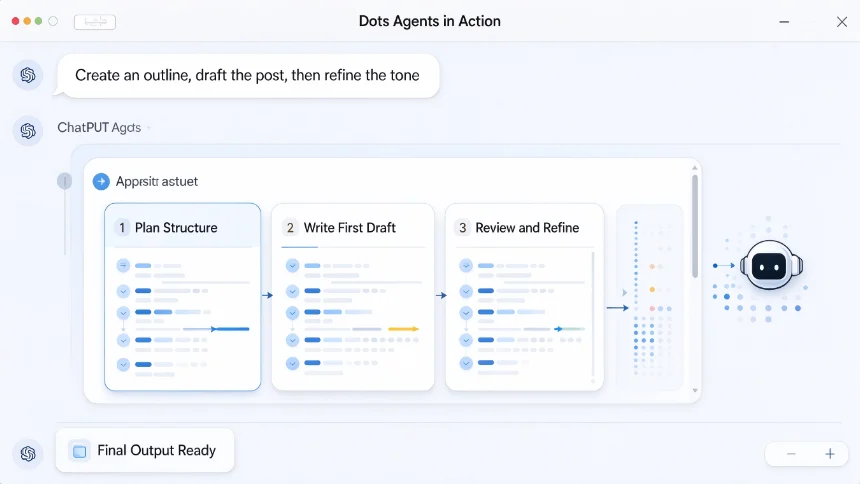
They handle sequential subtasks on your behalf, instead of only responding to one prompt at a time. If you ask to outline an article, gather reference points and then rewrite sections in a specific tone, the agent can move through these steps without you re‑prompting repeatedly.
Dots work within ChatGPT’s existing permission boundaries. They do not get unlimited access to your files or web browsing automatically; every external action still follows ChatGPT’s built‑in access rules.
How Dots Agents Differ From Custom GPTs
Custom GPTs are pre‑configured bots saved for repeated use, with preset instructions, uploaded knowledge and fixed tools. You select one GPT before starting your chat.
Dots Agents spawn dynamically mid‑conversation. The model judges when a task needs multi‑step work and spins up a lightweight agent instance for that specific job. Once the task wraps up, that agent session ends.
Custom GPTs are better for recurring workflows you refine over time. Dots are made for ad‑hoc, one‑off productivity tasks you start inside a regular ChatGPT chat.
What you can use Dots for in daily work
The best use cases are multi‑step creative and productivity jobs.
Drafting long content is one of the strongest fits. You can tell Dots to research basic background, create an outline, write a first draft, then trim it down for a social post version, all in one request.
You can also use them for content reorganization: take raw notes, sort key points, turn bullet points into structured sections, then adjust readability for non‑technical readers.
Simple planning work works well too. Trip outlines, content calendars, brainstorm lists and email sequence drafts can all be handled end‑to‑end.
Dots are not built for heavy research requiring hundreds of sources, advanced data analysis or building complex code projects. Keep expectations realistic for what these lightweight agents can deliver.
How to trigger Dots Agents
You don’t need a special toggle to turn Dots on. The system detects multi‑step requests automatically. That said, you can phrase prompts to make it easier for Dots to activate properly.
State the full sequence of tasks in one prompt. Instead of asking one small step at a time, lay out the whole workflow clearly. Mention the final output format and tone you want.
Bad example: Write an outline. Now draft it. Now shorten it. Better example: Create an outline for a beginner AI productivity post, write a full draft, then make a condensed version for LinkedIn captions. Stop and check with me before finalizing.
Adding a simple human checkpoint is a good habit. Tell the agent to pause for your review before making major rewrites. This prevents unwanted large edits.
Key limitations to keep in mind
Dots Agents still run inside ChatGPT’s context window limits. If your task pulls in huge volumes of text, the agent may lose track of earlier instructions.
They can still hallucinate facts, links or citations. For anything factual, always verify key claims yourself, especially for dates, stats and source references.
Dots cannot bypass ChatGPT’s tool limits. File uploads, browsing and code interpreter follow the same rules as normal chats. The agent just orchestrates the steps automatically, it does not unlock new capabilities.
Practical prompt tips for better results
Break large jobs into logical stages in your request. Name each deliverable you expect. Define your audience and tone upfront, so the agent does not guess. Add stopping rules: tell it to pause and show you the current work before moving to the next phase. Keep one main goal per agent task. Do not stack unrelated projects into a single request.
These small adjustments reduce back‑and‑forth and cut down the time spent correcting off‑target output.
Once you get comfortable defining multi‑step tasks, you will find Dots cuts down a lot of repetitive prompting work for everyday content and planning jobs.