Most AI coding editors still force you into constant manual babysitting: write prompt, copy generated code snippets, paste into files, run code, feed error logs back to AI and repeat the whole cycle over again.
Google Antigravity changes this workflow fundamentally. Built on Gemini 3, this agent‑first coding platform lets AI agents plan tasks, operate the editor, run terminal commands, spin‑up browser sessions for real‑world testing, and only interrupt you when human judgement or approval is truly required. It is a different paradigm compared to adding AI chat panels on top of regular code editors.
What exactly is Google Antigravity
Google Antigravity is Google’s agent‑oriented development environment. Instead of treating AI as a secondary chat sidebar tool, agents become first‑class citizens that can operate across editor, terminal and built‑in browser.
Beyond Gemini 3 as its primary model, the platform supports multiple large‑language models natively: Claude Sonnet and GPT‑OSS are available for selection. You can assign Gemini 3 for heavy agent workflows while switching to other models for specific subtasks according to your reasoning preference.
Its core design philosophy leans into agent autonomy. Agents are able to lay out multi‑step work plans, execute file edits, run tests, self‑inspect output and deliver verifiable results, instead of merely outputting isolated code fragments waiting for manual copy‑paste.
Installation and initial setup
Antigravity offers multiple distribution forms: standalone desktop client, standalone IDE, VS Code / JetBrains IDE extensions, CLI tool and Python SDK. The standalone desktop client is recommended for new users as the simplest starting point.
Major operating systems are supported: macOS (Monterey+, Apple Silicon & Intel), Windows 10+, mainstream Linux distributions. You sign‑in with your Google account during installation.
Two layers of rules can be configured to constrain agent behaviours:
- Global rules: Saved in
~/.gemini/GEMINI.md. Apply for every agent session. You can define language conventions, documentation standards, hard‑coded secret prohibition and other universal preferences. - Workspace / project rules: Project‑specific markdown config, can override or supplement global rules for the current repository.
At the time of writing, Antigravity public preview is free of charge with reasonable rate limits for Gemini 3 Pro usage.
Three core working surfaces
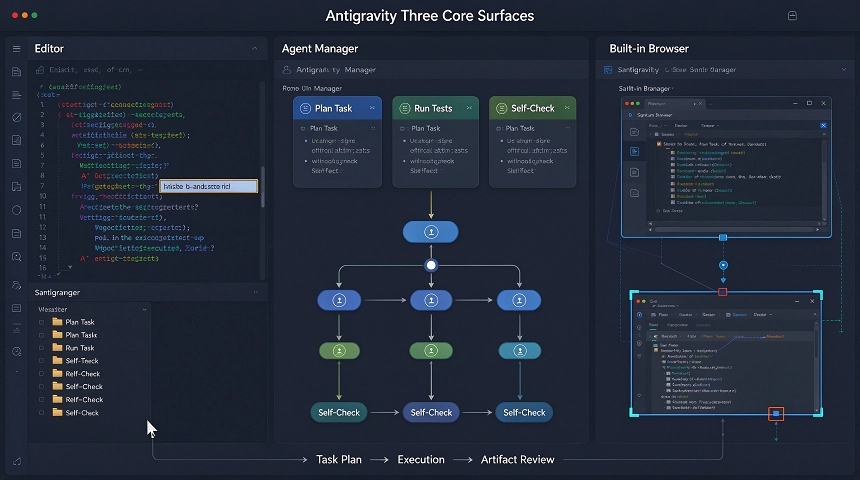
Antigravity is built around three interconnected surfaces rather than one single editor plus floating chat widget.
Editor surface
The familiar coding workspace. You still write code manually, accept inline completions and send natural‑language quick edit instructions. Autocompletion and context‑aware agent assistance are fully available, consistent with conventional AI‑enhanced editors.
Agent Manager surface
This component defines Antigravity’s differentiator. Agents are not embedded inside editor panels — your editor, terminal and browser are resources invoked by agent sessions.
You can dispatch multiple independent agents running background tasks concurrently: one fixes bugs, another scaffolds brand‑new features. You may close your laptop and return later to review finished plans, code diffs and test evidence. It breaks the synchronous editing limitation of traditional IDEs.
Built‑in Browser surface
A controllable sandbox browser dedicated for agent‑driven testing. This is especially valuable for frontend development, UI validation and web scraping work.
Agents can navigate pages, click interactive elements and capture screenshots or recordings. It validates actual UI rendering effect, instead of only relying on unit‑test pass or static code analysis.
Hand over tasks and review agent‑generated plans
Your typical workflow: submit natural‑language task requirement → agent generates execution plan → human review or directly approve execution → inspect final Artifact output.
Three practical tips to improve output quality:
- Clarify file paths and scope: specify exact folders or files the agent should touch, reduce guesswork over repository structure.
- Explicitly state your tech stack: name frameworks, databases and tooling you expect to use. Prevent agents from picking default toolchains you do not want.
- Adjust autonomy level: choose full proceed mode for experimental side‑projects. For production repositories, enable mandatory review before every file modification as safe guard.
Review work via Artifacts
Artifacts are Antigravity’s audit‑oriented review system. Once an agent finishes its assignment, it packages everything into one review‑ready artifact object.
Inside each artifact you will see: original execution plan, complete code diff set, test logs, plus visual evidence captured from built‑in browser such as screenshots or session recordings. You give feedback directly against these outputs to steer subsequent revisions.
You do not simply trust change logs; you obtain traceable proof showing what the agent actually executed before you merge modifications into your main codebase.
Compare: Antigravity vs Cursor vs Claude Code
- Cursor: Editor‑first product. Excellent inline completion and chat‑driven editing; agent capability acts as an add‑on module. Antigravity reverses the priority: Agent Manager holds equal status alongside code editor. Both support multi‑model switching, yet Antigravity ships native support for Gemini 3, Claude Sonnet and GPT‑OSS.
- Claude Code: Terminal‑native, great for long autonomous coding sequences. It lacks built‑in visual browser testing surface and dedicated artifact review system. You mainly consume terminal outputs and diff texts.
There is no absolute winner. Each tool targets partially‑overlapping scenarios. Antigravity shines for projects demanding visual UI verification and multi‑agent parallel orchestration. Cursor excels for day‑to‑day fast inline coding. Claude Code performs best for heavy terminal‑centric long‑run coding tasks.
Practical starting advice
Start with a small side‑project repository instead of critical production code. Write clear task requirements: designate target directories, specify tech stack, turn on pre‑change review checkpoints.
Form one critical habit: always look over agent execution plan before the agent modifies source files. This simple step avoids unexpected large‑scale rewriting of your codebase.
When you get comfortable with its multi‑surface workflow and autonomy controls, you can gradually bring it onto more complex codebases.