A lot of people write one prompt, get a response, and stop there. That approach works for quick answers, but it wastes the chance to build a repeatable system that delivers polished, ready-to-use content with minimal extra work.
You don’t need coding or custom GPTs to build this workflow. The whole system lives inside a single ChatGPT conversation, built from one core starting prompt, with staged handoffs and built-in review steps.
Start with a core goal prompt
Your base prompt defines the end deliverable, audience, tone and constraints. This is your foundation, not a one-and-done request.
A solid core prompt does not ask ChatGPT to “write something good.” It names exactly what you want to create, who it’s for, what voice to use, and any non-negotiable rules like word count or formatting.
Once this base instruction is set, every follow-up step references it. That keeps all later tasks aligned to your original objective instead of drifting off track.
Break the workflow into sequential stages
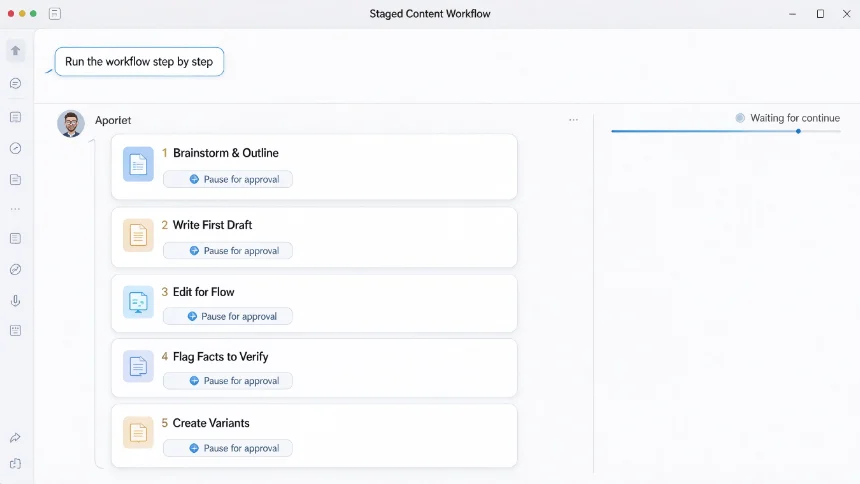
One prompt can trigger a multi-step pipeline. The key is telling ChatGPT to run tasks one phase at a time and pause for your check-in before moving forward.
A typical content workflow sequence looks like this:
- Brainstorm angles and create a structured outline
- Write the first draft following the outline and tone rules
- Edit for flow, cut filler sentences and fix awkward phrasing
- Fact-check all claim statements and flag anything unverifiable
- Rewrite into alternate versions for different platforms
You do not fire all these requests separately. Wrap them into your initial prompt, and set the rule: stop and show me the result after each stage, wait for approval before continuing.
Add built-in quality gates
Quality checks are what turn raw AI output into usable finished content. Build these review rules directly into your starting prompt.
Common gates you can include:
- Compare draft against the original outline to make sure no key section is missing
- Remove generic filler phrases that sound robotic
- Flag factual statements that need manual verification
- Check tone consistency across the whole piece
- Highlight sections that may need simplification for your target audience
These checks run inside the same chat thread, no extra tools required. It forces the model to audit its own work before handing it over.
Adjust prompts for different output variants
Once your base workflow works, reuse the same conversation to spin out alternate formats.
Take your finished long article and ask it to repurpose the same core content into social media captions, newsletter snippets or bullet-point summaries. Since all the original context stays in the thread, the new versions keep consistent messaging without you retyping background details.
This is the real payoff. You only define your core requirements once, then generate multiple content assets from that single source conversation.
Common mistakes to avoid
Many people fail at this workflow because they try to demand everything instantly in one giant output. When you skip pause points and quality checks, the result tends to be bloated, unfocused and full of generic phrasing.
Another misstep is changing the core goal halfway through the thread without restating the original rules. If you shift the audience or tone, restate your base prompt so every subsequent step stays aligned.
Also, don’t skip manual fact review. Even with built-in self-checks, AI can still invent details. Treat the self-audit step as a helper, not a full replacement for your own validation.
Simple example prompt template
Here is a practical template you can copy and adapt for your own content projects.
Follow this workflow step by step, pause and wait for my approval after each phase. Phase1: Brainstorm 3 content angles and create a detailed outline. Phase2: Write full first draft following the outline, target audience and tone defined above. Phase3: Edit the draft for readability, remove AI-style filler text. Phase4: Mark all factual claims that I need to verify manually. Phase5: Create 2 short social post variants from the final edited article. Do not move to next phase until I reply “continue”.
This template keeps control in your hands, while letting ChatGPT handle the repetitive lifting across every stage.
Once you get comfortable with this staged method, you will find that one well-built starting prompt can replace dozens of separate back-and-forth chats for every new content project.